Open Scan
Its own tab in the app. The camera opens at once.
Business card scanner
Point the camera at a paper card, or pick a photo. Clip Cards reads it on your iPhone, fills in the name, company, title, phones, emails and links, and you check before you save.
Its own tab in the app. The camera opens at once.
Hold the card in view, or choose a photo of it.
Save to People, or to People and Contacts.

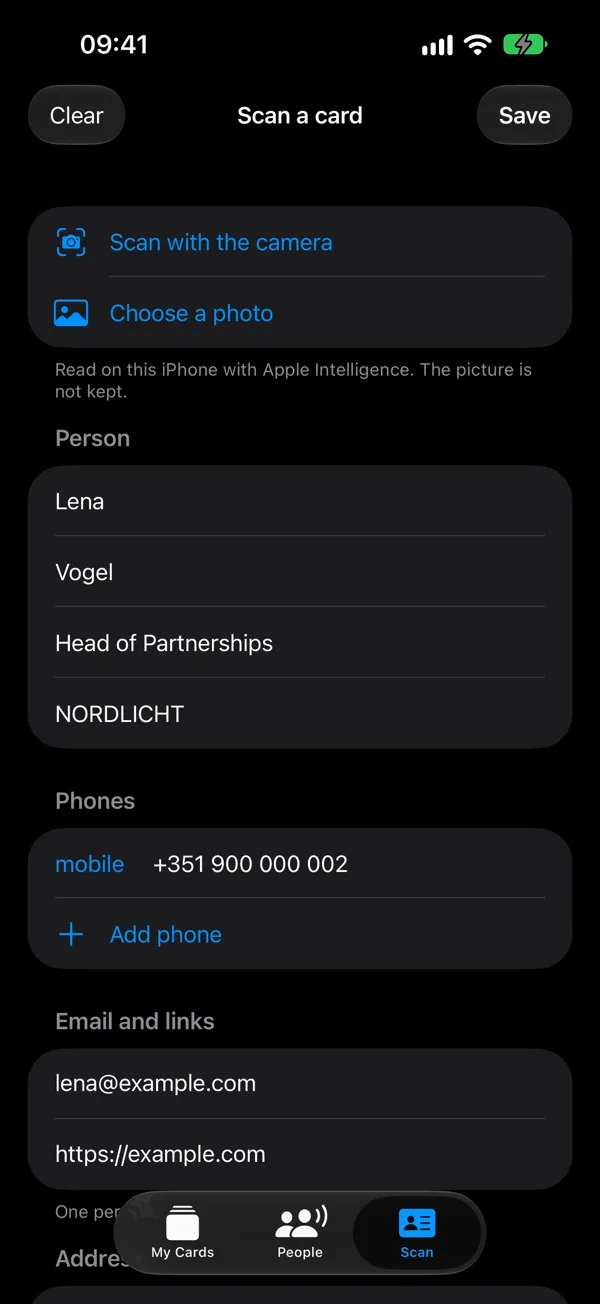
On an iPhone with Apple Intelligence, the name, company and title are picked out for you. Without it, the iPhone fills the same fields by itself. Phone numbers, emails and links come straight from the printed text.
Many badges carry a QR code. Clip Cards reads QR codes with a vCard, a Clip Cards link or a LinkedIn link, and fills in the person from them, with no text to recognise.
The card is read on your iPhone. The picture is not kept and is not sent to us. The people you scan stay on your iPhone, with your notes, until you export them as a spreadsheet (CSV) or contacts (vCard).
Each scan becomes a person in People. Say what you talked about and your iPhone writes it down, set a reminder to follow up, and ask Siri who you met at an event. The scanner is free, like the rest of the app.
Free, for iPhone with iOS 26. Tell us where you will use it.
Request an invite